
A queue that processes 40 jobs per second when you need 400 is a common place to end up. The instinct is to add workers. Frequently that changes nothing, because the constraint is per-job overhead rather than parallelism — and twenty workers each paying the same overhead just means twenty times the waste.
Find where the time goes before scaling anything.
Measure the shape first
class MeasureJobs
{
    public function boot(): void
    {
        Queue::before(fn (JobProcessing $e) => Cache::put("job:start:{$e->job->uuid()}", hrtime(true)));

        Queue::after(function (JobProcessed $e) {
            $start = Cache::pull("job:start:{$e->job->uuid()}");
            $ms = (hrtime(true) - $start) / 1e6;

            Log::info('job.processed', [
                'job' => $e->job->resolveName(),
                'duration_ms' => round($ms, 2),
                'payload_bytes' => strlen($e->job->getRawBody()),
            ]);
        });
    }
}
Compare that duration against wall-clock throughput. If jobs take 5ms each but you only manage 40/second per worker, the time is going somewhere outside handle() — almost certainly framework boot or queue polling.
The database driver is usually the problem
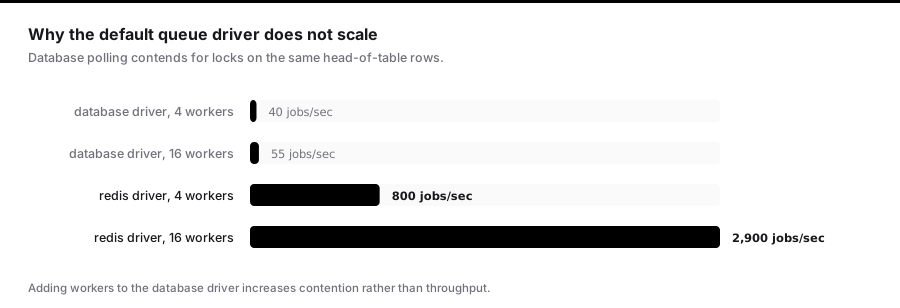
QUEUE_CONNECTION=database is the default in a fresh install and it does not scale. Every worker polls with a query like:
SELECT * FROM jobs
WHERE queue = ? AND (reserved_at IS NULL AND available_at <= ?)
ORDER BY id ASC LIMIT 1 FOR UPDATE SKIP LOCKED;
Two costs. First, workers poll on a fixed interval, so an idle queue still generates constant query load. Second — and this is the killer — every worker contends for locks on the same few rows at the head of the table. Adding workers increases contention rather than throughput.
At minimum, index it properly:
Schema::table('jobs', function (Blueprint $table) {
    $table->index(['queue', 'reserved_at', 'available_at']);
});
But the real fix is to stop using it. Redis pops jobs with BLPOP, which blocks until work arrives — no polling, no lock contention, and roughly an order of magnitude more throughput.
QUEUE_CONNECTION=redis
The database driver is fine for a handful of jobs an hour. It is the wrong tool at any real volume.
Payload size
Job payloads are serialised into the queue. A job holding an Eloquent model serialises the entire model — every attribute, plus loaded relations.
// Serialises the whole user, plus orders, plus each order's items
new SendReport($user->load('orders.items'));
SerializesModels helps: it stores only the class and key, then re-fetches on execution.
class SendReport implements ShouldQueue
{
    use SerializesModels;

    public function __construct(public User $user) {}
}
Now the payload holds an identifier rather than a document. Two things to know: the re-fetch is an extra query per job, and if the model is deleted between dispatch and execution, the job fails with ModelNotFoundException. That is usually the behaviour you want — set $deleteWhenMissingModels = true to discard silently instead.
For high-volume jobs, pass scalars and fetch deliberately:
public function __construct(public int $userId) {}

public function handle(): void
{
    $user = User::select('id', 'email', 'name')->findOrFail($this->userId);
    // ...
}
Smaller payload, and you control exactly which columns load.
Framework boot cost
queue:work boots Laravel once and loops, so boot is amortised. queue:listen boots a fresh process per job — that is 30–80ms of pure overhead before your code runs.
Never use queue:listen in production. It exists so code changes are picked up without restarting, which matters in development and nowhere else.
Even with queue:work, per-job overhead exists: the container resets application state between jobs. Keep service providers light, and make sure nothing expensive happens in a boot() method that runs for every job.
Batching and chunking
Dispatching 10,000 individual jobs means 10,000 payloads, 10,000 pops, and 10,000 container resets. Group the work:
$batches = collect($userIds)
    ->chunk(100)
    ->map(fn ($chunk) => new SendDigest($chunk->all()))
    ->all();

Bus::batch($batches)
    ->name('nightly-digests')
    ->allowFailures()
    ->onQueue('digests')
    ->dispatch();
One hundred jobs instead of ten thousand, each doing a hundred units of work. Overhead drops by two orders of magnitude, and you gain batch progress tracking and a completion callback.
Choose the chunk size against your timeout: a chunk must finish well inside --timeout, or a slow batch gets killed and retried in full.
Queue separation
A single queue means a 30-second report blocks a 50ms password reset behind it. Separate by latency requirement, not by feature:
dispatch(new SendPasswordReset($user))->onQueue('interactive');
dispatch(new GenerateReport($params))->onQueue('batch');
Then run dedicated workers:
php artisan queue:work --queue=interactive --sleep=0 --tries=3
php artisan queue:work --queue=batch --timeout=600 --tries=1
A single worker can also process in priority order:
php artisan queue:work --queue=interactive,batch
It drains interactive completely before touching batch. Good for prioritisation, risky for starvation — a sustained flood of interactive jobs means batch work never runs. Dedicated workers per queue avoid that.
Sizing workers
More workers is not linearly better. The right count depends on what jobs wait on.
I/O-bound jobs — HTTP calls, database queries, file operations — spend most of their time blocked. Workers can substantially exceed core count, because they are idle while waiting.
CPU-bound jobs — image processing, PDF generation, encryption — should be roughly core count. Beyond that you are context-switching, not parallelising.
The constraint that catches people is downstream. Fifty workers each holding a database connection is fifty connections, before the web tier gets any. Check that against max_connections before scaling up, or you will take the site down trying to speed up the queue.
Retries and backoff
public $tries = 3;
public $backoff = [10, 60, 300];
Escalating backoff matters when the failure is a rate limit or an overloaded dependency — immediate retries make the outage worse. This gives the downstream 10 seconds, then a minute, then five.
Guard against runaway retries with an expiry:
public function retryUntil(): DateTime
{
    return now()->addHours(2);
}
After that window the job fails permanently regardless of attempts remaining. Without it, a job with a long backoff and many tries can retry for days.
Monitoring what matters
Queue depth alone is not enough — a depth of 1,000 is fine if you process 500/second and catastrophic if you process 5.
Track age of the oldest job:
$oldest = Redis::lrange('queues:default', -1, -1);
$payload = json_decode($oldest[0] ?? '{}', true);
$ageSeconds = time() - ($payload['pushedAt'] ?? time());
Alert on that, not on depth. It is the metric that maps directly onto "how long is a user waiting", and it stays meaningful as your throughput changes.
The order to work through
- Move off the database driver.
- Measure per-job duration against wall-clock throughput to find hidden overhead.
- Shrink payloads; pass identifiers, not object graphs.
- Batch high-volume small jobs into chunks.
- Separate queues by latency requirement.
- Only then add workers — and check your connection budget first.
Horizon and what its metrics actually mean
Horizon's dashboard is the fastest way to understand a Redis-backed queue, provided you read the right numbers.
Wait time is the headline. It is the age of the oldest job per queue, which as noted is the metric that maps onto user experience. Configure thresholds so it alerts:
// config/horizon.php
'waits' => [
    'redis:interactive' => 30,
    'redis:batch' => 900,
],
Throughput is jobs per minute. Useful for capacity planning, misleading during incidents — throughput can look healthy while wait time climbs, because a flood of new jobs arrives faster than a perfectly healthy worker pool can drain it.
Runtime per job class is where you find the outlier. One job class averaging 8 seconds among others at 40ms is where your worker capacity is going.
Auto-scaling by wait time rather than queue depth is the setting most worth changing:
'defaults' => [
    'supervisor-1' => [
        'connection' => 'redis',
        'queue' => ['interactive', 'default', 'batch'],
        'balance' => 'auto',
        'autoScalingStrategy' => 'time',   // not 'size'
        'minProcesses' => 2,
        'maxProcesses' => 40,
        'balanceMaxShift' => 3,
        'balanceCooldown' => 3,
        'tries' => 3,
        'timeout' => 60,
    ],
],
'time' allocates workers to whichever queue has the longest wait, which is almost always what you want. 'size' allocates by depth, which starves a queue of slow important jobs in favour of a queue full of fast trivial ones.
Unique jobs
A user clicking "generate report" five times should not produce five reports:
class GenerateReport implements ShouldQueue, ShouldBeUnique
{
    public int $uniqueFor = 3600;

    public function __construct(public int $reportId) {}

    public function uniqueId(): string
    {
        return (string) $this->reportId;
    }
}
While one instance is queued or running, further dispatches with the same uniqueId are silently discarded. uniqueFor is the safety valve — if the job dies without releasing the lock, it expires rather than blocking that report forever.
ShouldBeUniqueUntilProcessing releases the lock when processing starts rather than when it finishes, which is right when you want to allow a new run to be queued while the current one is still going.
This requires a cache driver supporting locks — Redis, Memcached, DynamoDB, or a database. It fails open on drivers that do not, which means it silently does nothing on the array or file drivers. Worth asserting in a test.
Rate-limited jobs
When the constraint is a third-party API rather than your own capacity, throttle the job rather than the worker count:
public function middleware(): array
{
    return [
        new RateLimited('shipping-api'),
        (new WithoutOverlapping($this->order->id))->releaseAfter(60),
    ];
}
RateLimiter::for('shipping-api', fn () => Limit::perMinute(60));
A job that exceeds the limit is released back to the queue rather than failing, so it retries automatically without consuming an attempt. This is far better than sleeping inside the job — a sleeping job occupies a worker doing nothing.
WithoutOverlapping keyed to a resource identifier prevents two jobs mutating the same entity concurrently, which is a cheaper and clearer alternative to database locking for a lot of queue work.
Failed jobs are a queue you must also drain
failed_jobs grows silently and is often ignored until someone asks why an email never arrived.
php artisan queue:failed
php artisan queue:retry {id}
php artisan queue:retry all
php artisan queue:flush --hours=168
Two things worth wiring up.
Alert on the failure rate, not the total:
Queue::failing(function (JobFailed $event) {
    Metrics::counter('jobs_failed_total')->withLabels([
        'job' => $event->job->resolveName(),
        'exception' => $event->exception::class,
    ])->increment();
});
Handle permanent failure explicitly in jobs where silence is costly:
public function failed(Throwable $e): void
{
    $this->order->update(['status' => 'payment_failed']);

    Notification::route('slack', config('alerts.webhook'))
        ->notify(new JobPermanentlyFailed($this->order, $e));
}
Without a failed() method, a job that exhausts its retries vanishes into a table nobody reads, leaving a record in a permanently intermediate state.
Choosing a driver, honestly
| Driver | Throughput | Ordering | Operational cost | Use when |
|---|---|---|---|---|
sync |
n/a | n/a | none | Local development and tests |
database |
very low | FIFO | none extra | A handful of jobs per hour |
redis |
high | FIFO per queue | Redis to operate | The default for real workloads |
sqs |
high | not guaranteed | managed | You want no queue infrastructure |
beanstalkd |
high | FIFO with priorities | another daemon | Priorities matter and Redis is unavailable |
Two things about SQS specifically. Standard queues are at-least-once with no ordering guarantee, so duplicates and out-of-order delivery are normal operation, not failures — your jobs must be idempotent. FIFO queues fix both at a substantially lower throughput ceiling.
And SQS long-polls, which is efficient, but its visibility timeout must exceed your job timeout or you will get concurrent duplicate processing as described in any discussion of worker shutdown.
Transactions and dispatch ordering
The most common queue bug in Laravel applications is not throughput at all:
DB::transaction(function () use ($data) {
    $order = Order::create($data);
    ProcessOrder::dispatch($order);      // may run before the commit
});
The job can be picked up by a worker on another machine before the transaction commits. It queries for the order, finds nothing, and fails with ModelNotFoundException — intermittently, under load, in a way that never reproduces locally.
// config/queue.php
'redis' => [
    'driver' => 'redis',
    'after_commit' => true,
],
Or per dispatch: ProcessOrder::dispatch($order)->afterCommit().
Turn this on globally. There is essentially no case where dispatching before commit is desirable, and the failure it causes is one of the harder ones to diagnose from a stack trace.
The order to work through
- Move off the
databasedriver. Nothing else matters until this is done. - Enable
after_commit— it is a correctness fix, not a performance one, and it costs nothing. - Measure per-job duration against wall-clock throughput to find overhead outside
handle(). - Shrink payloads — pass identifiers and select only the columns you need.
- Batch high-volume small jobs into chunks of a few hundred.
- Separate queues by latency requirement, with dedicated workers per queue.
- Alert on oldest-job age, not depth.
- Only then add workers — and check your database connection budget before you do, because fifty workers is fifty connections.