
You open a website.
You see a headline, some images, perhaps a few ads and a cookie banner. Nothing looks particularly unusual.
Then you open Developer Tools.
Suddenly the page looks less like a document and more like a small distributed system. Your browser has contacted dozens of domains. Some belong to the website. Some belong to analytics companies. Some belong to advertising platforms. Some are CDNs. Some are impossible to identify from the filename alone.
And hidden among those requests are tiny resources whose only purpose is to tell another company:
"Someone just visited this page."
That is the uncomfortable part of modern web advertising. The tracker doesn't need to look like a tracker. It can be an image, a JavaScript file, a stylesheet, a font, a redirect, a JSON request, a tag-manager container, or a request to a subdomain that appears to belong to the website itself.
The browser doesn't care what the resource means to you. It only knows the page asked for it.
Every request is therefore a clue. This is how the invisible layer of the web becomes visible.
Let's start with this page
Rather than describe the problem abstractly, here is a measurement of the page you are reading, taken with a cold browser profile — cache and cookies cleared — using the Chrome DevTools Protocol.
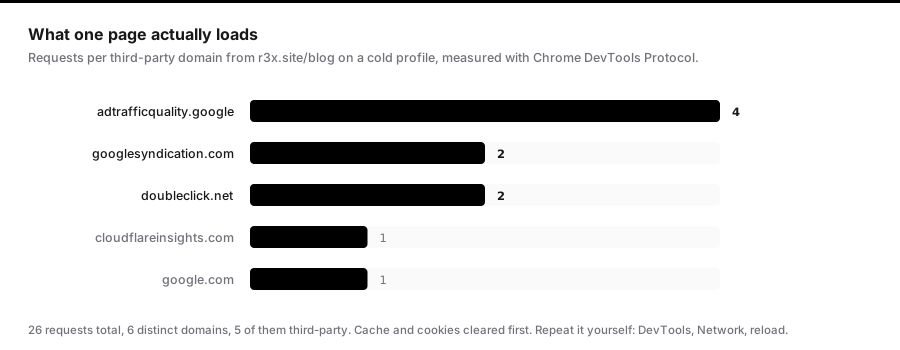
26 requests. 6 distinct domains. 5 of them third-party.
This site is one person's blog. It runs Google AdSense and sits behind Cloudflare, and that is the entire explanation for every domain in that list. There is no analytics suite, no tag manager, no social pixel, no data broker.
I am showing you my own site's numbers rather than picking on someone else's, for two reasons. First, you can verify them — open DevTools, reload, and count. Second, it makes the point more honestly than a screenshot of a worst-case offender would: this is what a deliberately minimal, ad-supported page looks like. A commercial publisher running a consent platform, a tag manager, several analytics vendors and a header-bidding stack will produce a list many times longer.
If you try this measurement yourself on a large news site, be aware of one trap I ran into while writing this: an automated browser doesn't click the cookie banner, so the advertising stack never loads and the site looks far cleaner than it is. Consent-gated tracking is invisible to naive automation. Measure with a real browser, after accepting, if you want the real number.
The web is built from other people's files
A modern website is rarely a single server delivering a single HTML document. The HTML is more like an instruction sheet. It tells your browser to fetch other things:
<img src="https://cdn.example.com/images/hero.webp">
<script src="https://analytics.example.net/analytics.js"></script>
<iframe src="https://ads.example.org/ad.html"></iframe>
The browser follows those instructions. The site in your address bar can therefore cause your browser to contact many other servers.
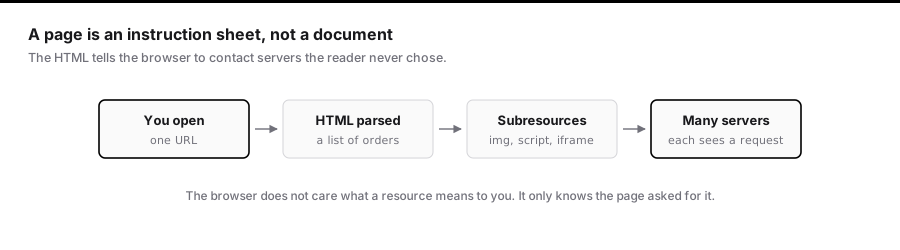
The W3C's discussion of web tracking explains the privacy consequence: when a page embeds a third-party image, script, or other resource, the browser makes a request to that third party, potentially exposing information such as IP address, cookies, and referrer data.
The 2025 Web Almanac describes third parties as ubiquitous across the modern web — JavaScript, images, advertising, analytics, social integrations, payments and content delivery.
This is not an obscure edge case. It is how much of the modern web works.
One distinction matters before we go further:
A third-party request is not automatically malicious, and a first-party request is not automatically harmless.
Sites legitimately depend on third parties for payments, video, fonts, security and CDNs. The interesting questions are: who receives the request, why, what accompanies it, and what can they connect it to?
The tiny file that says "someone was here"
One of the oldest tracking mechanisms is the tracking pixel. It doesn't have to be literally one pixel any more — the name survived because the original technique used an invisible 1×1 image.
A page contains <img src="https://tracker.example.com/pixel.gif">. The browser requests the image. The server receives the request. The server records that it happened.
The Federal Trade Commission describes tracking pixels as having evolved from tiny images into broader forms of HTML and JavaScript embedded in websites and email, used to track page views, clicks, purchases and other interactions.
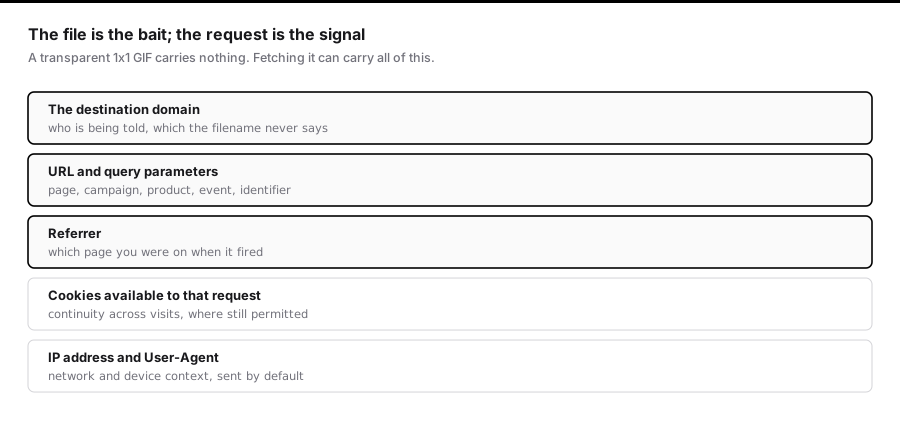
The important insight is that the file itself doesn't need to contain anything interesting. The interesting part is the request.
The request is the real data
Suppose a site contains:
<img src="https://tracker.example.com/pixel.gif?page=gaming&article=123">
The image might genuinely be a transparent GIF. But the HTTP request carries more:
GET /pixel.gif?page=gaming&article=123 HTTP/2
Host: tracker.example.com
Referer: https://example.com/gaming/article
Cookie: tracker_id=abc123
The exact headers depend on the browser, request context and privacy settings. But the architecture is the point. The resource is the bait. The request is the signal.
The FTC's overview of internet cookies explains that cookies can allow a site to recognise a browser over time and use that to remember activity, preferences and support targeted advertising.
The important word is potentially. A request does not magically reveal everything about a person, and modern browsers deliberately restrict cross-site tracking. Safari, Firefox, extensions, network blockers and consent settings all change what trackers actually receive.
The filename is the least interesting part
People search source code for words like tracker.js or tracking.gif. You won't find anything that obvious. Real systems use ordinary names: /app.js, /runtime.js, /collect, /event, /config.json, /pixel, /sync, /tag.js.
The filename doesn't tell you who operates the endpoint. The domain does — and sometimes even the domain isn't enough, which we'll come to.
How one request becomes a profile
A single page view isn't particularly valuable. Millions are.
When the same tracker appears across many websites, it can compile a picture of what a person does online. Mozilla explains how this information gets used for profiling, advertising, or sharing with other parties.
The resulting profile doesn't necessarily contain your name. It contains an identifier — and the identifier is valuable precisely because it provides continuity.
Cookie syncing: when trackers introduce you to each other
Different advertising companies hold different identifiers for the same browser. Company A knows you as A-83921; Company B knows you as B-12984. If they can establish that both refer to the same browser, they can join their records.
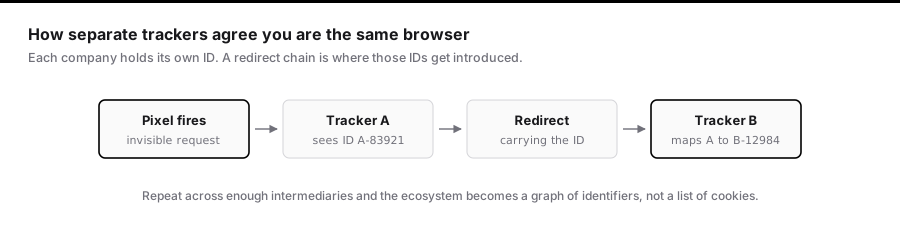
The EFF's Behind the One-Way Mirror describes how an invisible pixel can trigger a request to an ad exchange, which redirects the browser to another advertising company while carrying an identifier that lets the second company associate its ID with the first.
Do this across enough companies and the ecosystem becomes a graph of identifiers rather than a list of cookies.
The auction behind the ad slot
Modern advertising is largely programmatic. Instead of a publisher choosing an advertiser, software runs an auction for each impression: the ad slot goes to a supply-side platform, into an exchange, out to bidders, and a winner is selected — usually in under a second.
The FTC's analysis of real-time bidding notes that ad auctions can involve sharing a range of consumer information among publishers and intermediaries, potentially including location and cookie-related data.
The point isn't that every impression exposes the same information. It's that advertising infrastructure turns a page view into a distributed data transaction.
"But I block third-party cookies"
Third-party cookies became the best-known mechanism for cross-site tracking, and browsers responded aggressively. Safari blocks them by default through Intelligent Tracking Prevention. Firefox blocks known cross-site tracking cookies through Enhanced Tracking Protection.
But tracking didn't disappear. The industry adapted.
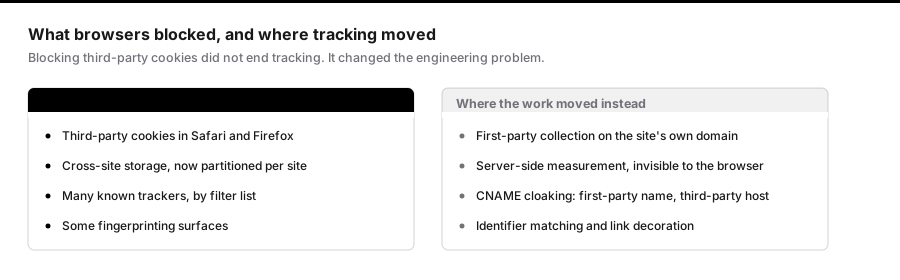
Which is why "I blocked cookies" and "nothing can track me" are very different statements.
First-party tracking is the new battlefield
A site at example.com loads something from track.example.com. At first glance that looks first-party. But what if track.example.com is a DNS alias that routes to infrastructure operated by an advertising company?
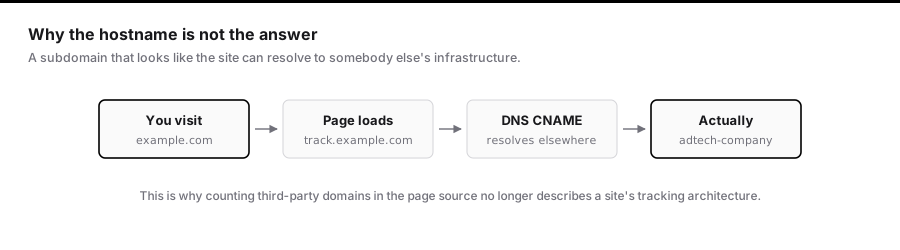
This is CNAME cloaking, and WebKit explicitly documents defenses against it, describing cases where a first-party-looking subresource resolves through a CNAME to another party's infrastructure.
The URL looks first-party. The infrastructure isn't. This is why counting third-party domains in page source no longer describes a site's tracking architecture.
Google's own documentation describes Google tag gateway for advertisers, which loads a Google tag from a site's own first-party infrastructure while forwarding measurement requests to Google. That doesn't make every first-party endpoint a secret tracker. It means:
The hostname visible in the browser isn't always enough to know who ultimately processes the data.
Hashing doesn't automatically mean anonymous
A common defence is "we hash the email address." Hashing is useful, but it doesn't automatically make a value anonymous.
The FTC has specifically warned that hashed personal information can still be problematic — hashed identifiers may leak enough to identify or link a person, and hashes can be matched against other datasets.
The original email isn't in the request. But if another system can generate the same hash from a known address, the value becomes a joining key. The gap between "I know your email" and "I have a stable identifier that matches your email" is smaller than it looks.
Fingerprinting changes the game
Cookies aren't the only way to identify a browser. Screen properties, OS characteristics, installed capabilities, graphics information, time zone, language and rendering behaviour can combine into a fingerprint.
Individually these attributes identify nobody. Together they can. Firefox identifies fingerprinting as a tracking technique and includes protection against it among its privacy features.
The distinction is simple. Cookie tracking says remember this identifier. Fingerprinting says recognise this browser by its characteristics — no storage required.
How to audit any site yourself
You don't need special tools. Your browser already has them.
1. Open DevTools. Right-click → Inspect → Network, or Cmd + Option + I on macOS. Then reload — the Network panel only records requests made while it's open.
2. Look at the domains. Not every third party is a tracker. A CDN may serve an image; a payment processor may handle checkout. You need context.
3. Filter by resource type. Tracking appears across several: JS, Img, Fetch/XHR, Doc, Frame. A pixel may be an image; a modern analytics event is usually a fetch.
4. Click a request and read the Initiator. This is the most useful field in the panel, and the one most people ignore. It answers: what caused this request? Chrome documents it in the Network reference.
5. Follow the chain. The first suspicious file often isn't the endpoint collecting data — it's the loader. A tag manager loads analytics, which loads an event endpoint; an advertising script loads a pixel, which triggers a sync request. Page source drastically understates how many systems are involved, because most of them arrive at runtime.
For each suspicious request, five questions: Who owns the domain? What initiated it? What's being requested? What's being sent? What happens next? That last one — following the redirects — is usually the most revealing.
Don't confuse tracking with malware
A tracker isn't malware. An analytics script isn't automatically malicious. Advertising technology exists because sites need to fund themselves and measure whether anything works.
The privacy questions are about transparency, consent, data minimisation, purpose, retention, sharing and user control. The FTC's work on pixels makes this clear: tracking technology can have legitimate uses while still creating real privacy concerns when sensitive or unexpected information is collected.
That's a more useful frame than "all tracking is evil."
Where it stops being about advertising
Advertising data can travel well beyond the site that collected it.
In May 2026, the FTC announced a settlement with data broker Kochava and its subsidiary, banning them from selling, sharing or disclosing sensitive location data without affirmative express consent. The FTC's definition of "sensitive" is worth reading closely: precise location associated with medical facilities, religious organisations, sites providing education or childcare to minors, homeless shelters, domestic violence shelters, and military or law enforcement sites.
A separate action against Mobilewalla addressed the collection and sale of sensitive location information, including data obtained from real-time advertising auctions.
These cases don't mean every ad request feeds a database of your life. They demonstrate something narrower and more important: advertising infrastructure can become a data source far beyond choosing which banner appears on a page.
What you can actually do
Use your browser's protection. Firefox's Enhanced Tracking Protection and Safari's WebKit prevention are on by default and do most of the work.
Add a content blocker. uBlock Origin blocks requests by filter list. EFF's Privacy Badger takes a different approach, learning which third-party domains appear across sites and restricting them based on observed behaviour.
Inspect things yourself. Open DevTools, reload, sort by domain, read the initiators, follow the redirects. Do it a few times and websites stop looking like documents. They start looking like dependency graphs.
A note on where you're reading this
This site shows ads through Google AdSense. That's why doubleclick.net and googlesyndication.com appear in the measurement at the top — I'm describing a system I participate in, not one I stand outside of.
I don't think that's a contradiction, but it would be dishonest not to name it. The argument here isn't that advertising shouldn't exist. It's that people should be able to see what a page does, and decide for themselves. The privacy policy says plainly which third-party cookies this site causes, and the opt-out links are there for anyone who wants them.
If you block the ads on this page, that's a legitimate choice and the article still works.
The invisible hand isn't invisible
Cookies are one piece. Pixels are one piece. JavaScript is one piece. The real system is the network of companies, domains, identifiers, scripts, redirects, auctions and measurement endpoints connecting them.
The good news is that it isn't actually hidden. Your browser exposes the requests. DNS exposes infrastructure relationships. Headers expose context. Once you can follow a request, a tiny anonymous-looking file becomes a map of the system behind it.
The file isn't the interesting part. The trail it leaves is.
So don't ask "does this website have a tracking pixel?"
Ask: "Who does my browser talk to when I open this page, what do I send them, and what happens next?"
Once you start asking that, the invisible web becomes surprisingly visible.
References and Further Reading
- FTC — Lurking Beneath the Surface: Hidden Impacts of Pixel Tracking
- FTC — Internet Cookies
- FTC — Unpacking Real-Time Bidding (Mobilewalla)
- FTC — Kochava settlement, May 2026
- FTC — Social Media and Video Streaming Surveillance Report
- WebKit — Tracking Prevention
- WebKit — CNAME Cloaking and Bounce Tracking Defense
- Mozilla — Enhanced Tracking Protection
- Mozilla — Trackers and Scripts Firefox Blocks
- Chrome DevTools — Network Panel
- Chrome DevTools — Network Reference
- Google — Tag Gateway for Advertisers
- EFF — Behind the One-Way Mirror
- EFF — Privacy Badger
- W3C — Web Tracking Protection
- HTTP Archive Web Almanac 2025 — Third Parties